Beat Studio 1.9: PDF Export and Smoother Performance
Beat Studio 1.9 exports drum notation to PDF, colours the audio import waveform, adds a Pro Trial edition, and makes training and notation views smoother.
I’ve been working on a bigger feature for the next version, but I didn’t want these improvements to wait until it’s ready. So here’s a smaller update with PDF export and a round of optimisations you can enjoy right away.
New
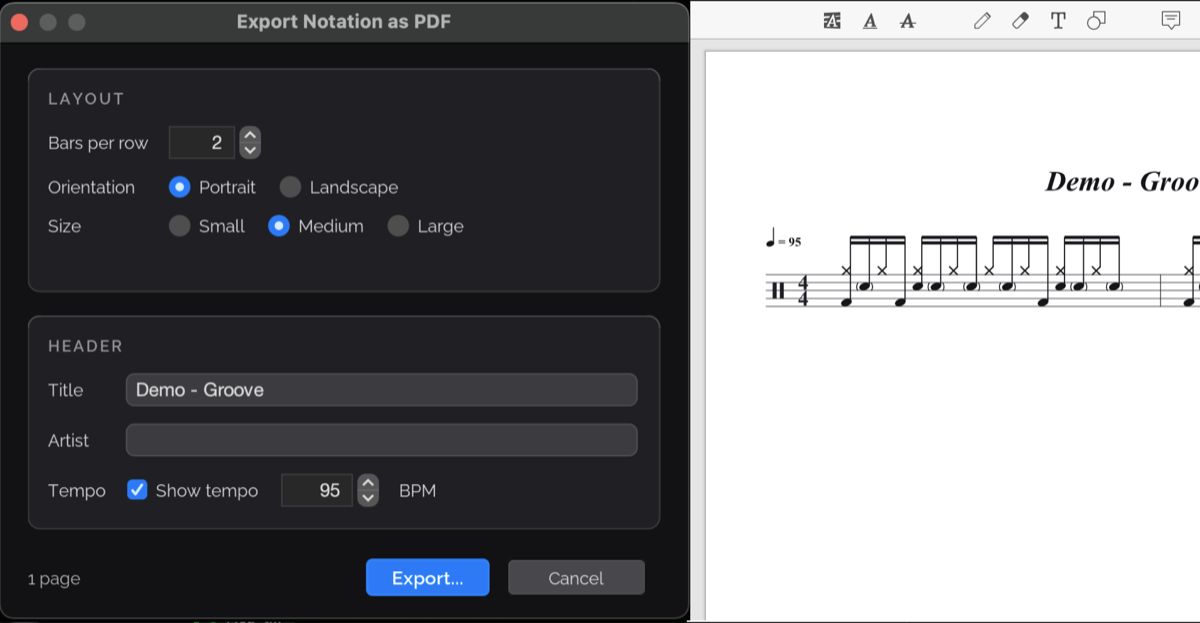
Export notation to PDF. Print or share your drum notation as a PDF. You can set bars per row, orientation, size, title and artist, and tempo — the dialog and an exported page are shown at the top of this post.
Colourised waveforms in audio import. The kick-alignment step now uses the same spectral colouring as the pattern editor, introduced in 1.8.
Kit from song. Samples now start with a light Smooth end (0.3 s), so hits cut short in the song fade out naturally. You can adjust it per sample in Sample EQ. If you haven’t tried building a kit from a song yet, there’s a step-by-step tutorial.
Try Pro before you buy. Not sure if Pro is right for you? The new Pro Trial edition unlocks every Pro feature, so you can explore everything before deciding. Playback stops after 10 seconds, but you can restart it as often as you like. The trial keeps its own separate library.
Improved
- Smoother trainer and notation views. Scrolling during playback and training is smoother and uses less CPU.
- Faster, more responsive meters. The mixer, points, timing-deviation and velocity meters and the streak badge all redraw with less work.
- Drum kit dialogs load their waveforms faster.
- Graphics on Windows. Rendering is more reliable and uses less CPU when idle.
That’s 1.9. Download links are in separate posts on Patreon.